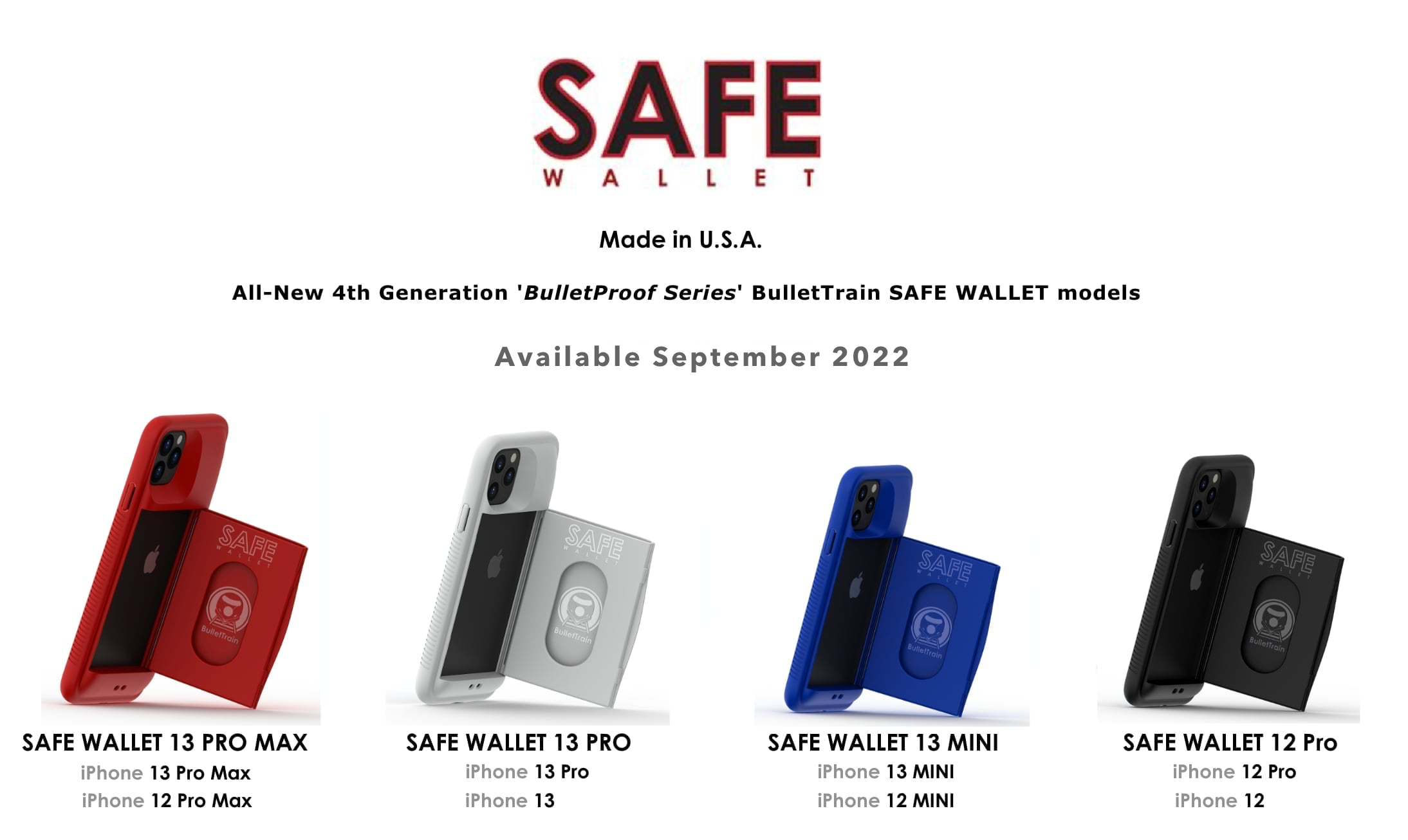
SAFE WALLET
for iPhone 12, 13, 14, & 15
Available NOW for Purchase!
If you’re interested in buying our new 4th Generation BulletProof Series (TPU) BulletTrain SAFE Wallet, they are available now for $150 and come with a lifetime warranty against manufacturing defects. An optional SAFE LEASH or SAFE PURSE STRAP is available for $30.
These new models aren’t available on our website @ BulletTrain.com yet, but you can order them by following the instructions below.
*Prices Include FREE United States Shipping

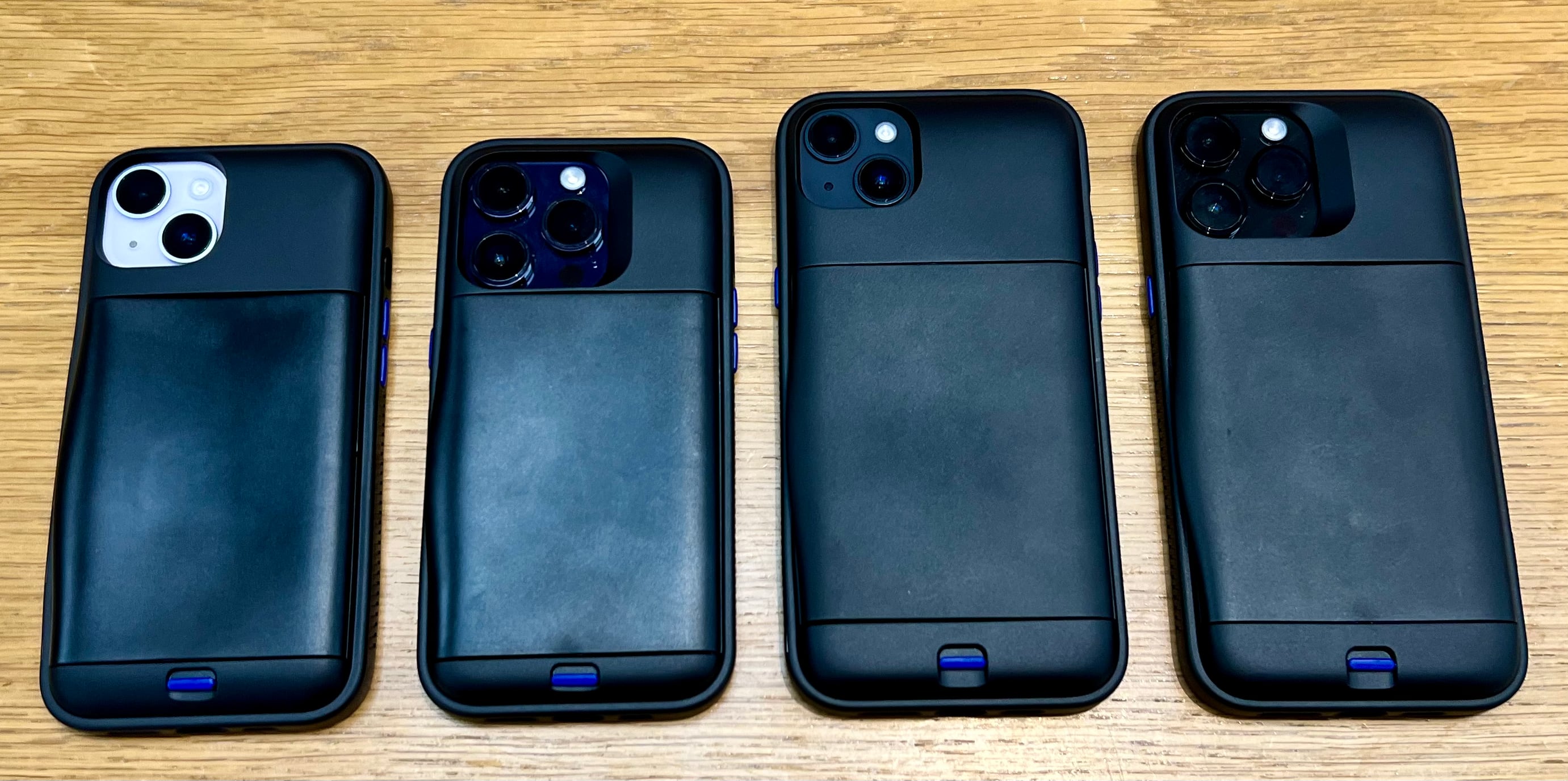
*All models are available ONLY in black with black buttons.
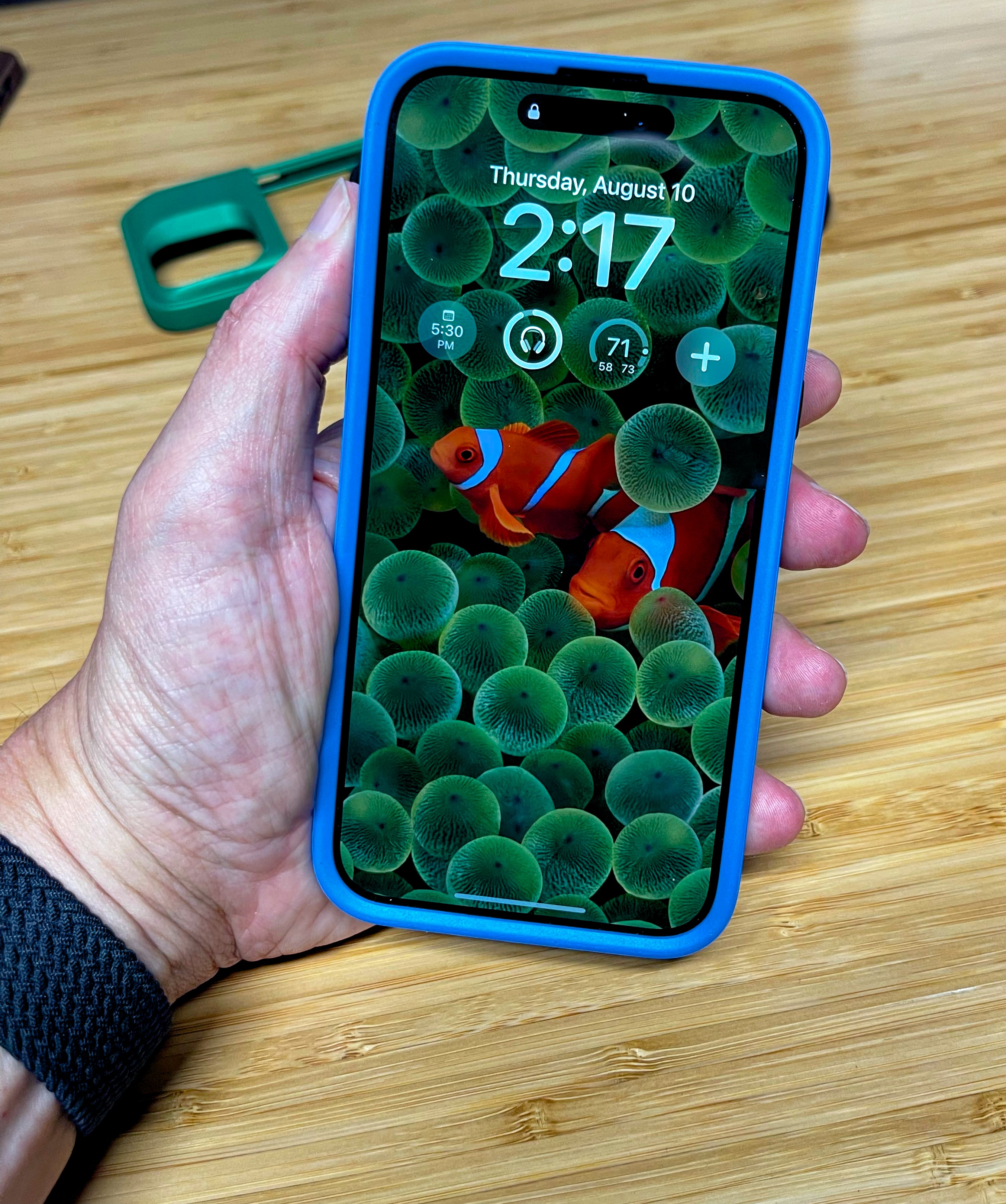
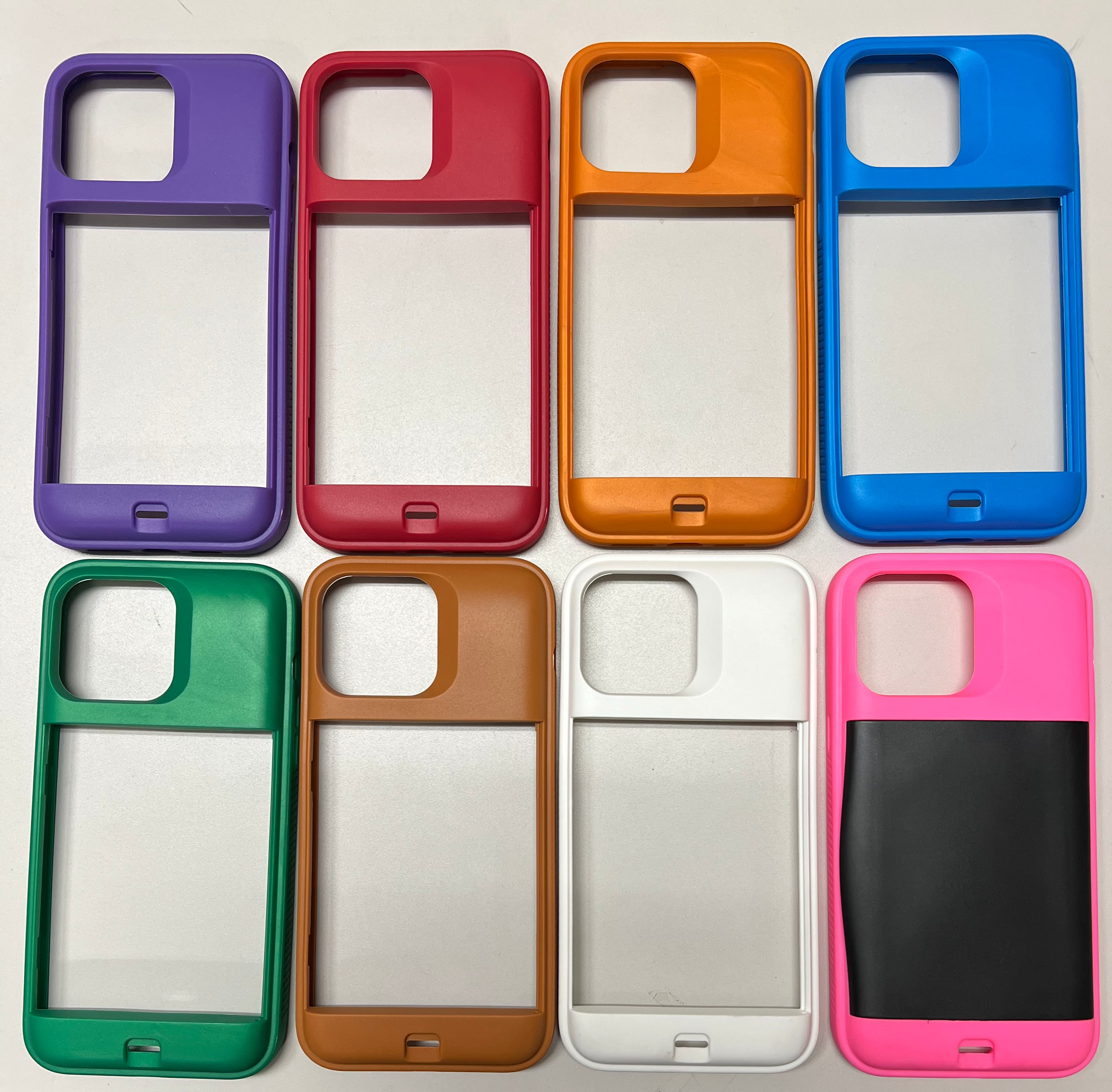
The BulletTrain SAFE Wallet 15/14 PRO MAX model, is available in limited quantities in the following colors:
BulletTrain Blue, Ruby Red, Milk Chocolate, Butterscotch

Royal Purple, Tahitian Blue, Polar White, Stealth Black
*We currently don’t offer a BulletTrain SAFE Wallet for iPhone 15 or iPhone 15 PRO.
All 4th Generation BulletTrain SAFE Wallet models now include our SAFE LEASH quick disconnect, enabling easy attachment of our SAFE LEASH or SAFE PURSE STRAP.
To purchase one of the above listed BulletTrain SAFE Wallet models, please follow these simple directions:
U.S. Orders
If you are located in the United States and wish to purchase a BulletTrain SAFE WALLET for your iPhone 12, 13, 14, or 15 model:
Step 1: Send $150 via PayPal to:
Sales@BulletTrain.com.
Step 2: Send an email to:
Help@BulletTrain.com confirming you sent the $150 via PayPal. Include
Include the following:
-Your iPhone Model choice
-Your First and Last NAME
-Shipping address
Upon receiving your email and payment we will respond to confirm your order. Any and all returns are subject to our standard 20% restocking fee.
ALL INTERNATIONAL Orders
If you are located outside of the United States and wish to purchase a BulletTrain SAFE WALLET for your iPhone 12, 13, 14, or 15 model please follow these instructions:
Step 1: Send $220 via PayPal to ($150 for the SAFE WALLET and $70 for International shipping) to Sales@BulletTrain.com.
Step 2: Send an email to Help@BulletTrain.com confirming you sent the $220 via PayPal.
Include the following:
-Your iPhone Model choice
-Your First and Last NAME
-Shipping address
Upon receiving your email and payment we will respond to confirm your order. Any and all returns are subject to our standard 20% restocking fee.
iPhone 16 Pro Max Cases?
Many of our customers love their SAFE WALLET models so much, they won't upgrade their iPhone model if they can't get a SAFE WALLET for it. We are working on our designs for the iPhone 16 family of BulletTrain SAFE Wallets, and just showed off our iPhone 16 PRO MAX BulletTrain SAFE Wallet design.
BACKGROUND
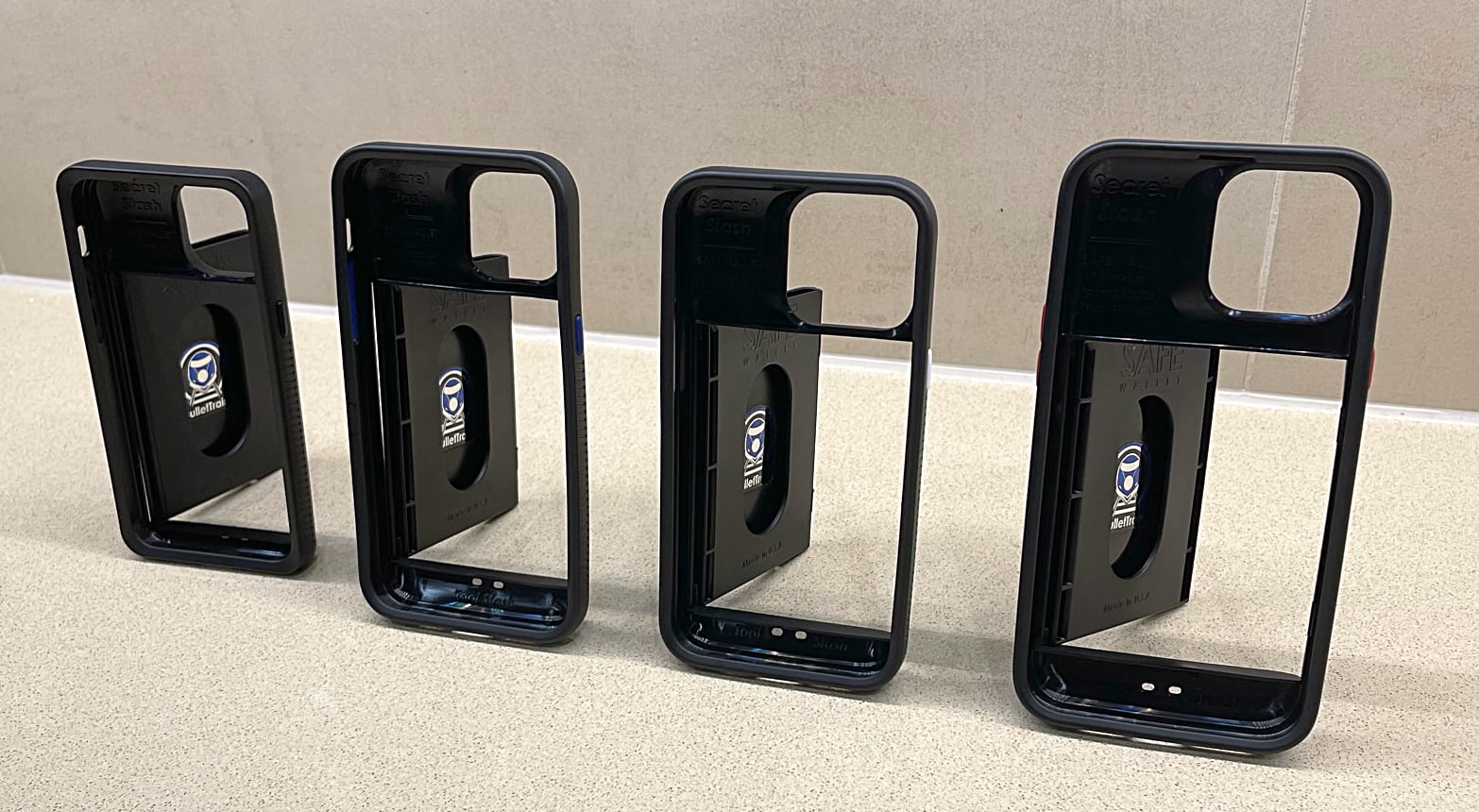
The new SAFE WALLET models are now made in the U.S.A. and are made 100% out of TPU, which means they are now indestructible, and come with a lifetime warranty against manufacturing defects. TPU is the rubbery material we used on the front bumpers on all previous BulletTrain SAFE Wallet models from our iPhone 4- iPhone X models.
We have had many customers who have tested these production models and they can't believe how sturdy they are, as they tend to not ever show any wear.
SCREEN PROTECTORS?
BulletTrain experimented with years on trying to develop screen protectors, but no matter what they were a complete pain to install and deal with. Jake, who is the designer at BulletTrain has been testing and using Generation 4 (ALL TPU Models) for the past 4 years, since he made the first BulletTrain SAFE Wallet for iPhone 12 Pro Max, and has never used a screen protector, and has experienced many bad drops, but the SAFE WALLET models have ALWAYS protected the iPhone glass.
Also, out of the many customers who have beta tested 12, 13, 14, and 15 BulletTrain SAFE Wallets, not one has reported having broke their screen, Jake believes this is due to the fact that the latest generation BulletTrain SAFE Wallet has an unusually thick and highly protective front bumper system. The reason this is unusual is that when you look at a current generation BulletTrain SAFE Wallet, it's so skinny and comfortable in the hand, you don't really notice how aggressive the front bumper design really is.
So while it's up to you, Jake believes it highly unlikely customers need screen protectors with all TPU BulletTrain SAFE Wallet models.
More Information
We have been hard at work at BulletTrain on many levels. In case you are not aware, after moving production from China to the U.S., our manufacturer was purchased by another company, which basically destroyed our relationship as they fired our contact we had been working with for years who had been at the company for around 30 years. This forced us to find another U.S. manufacturer, which we have done, so now we are moving full speed ahead again.
100% TPU SAFE WALLETS
Our latest generation of BulletTrain SAFE Wallet are very similar to our older generations, with one major difference as they are now made entirely from TPU, which is the acronym for Thermoplastic Polyurethane.
TPU is basically the black rubbery material on the front edge of our previous generation BulletTrain SAFE Wallet models. In other words, the entire BulletTrain SAFE Wallet is now made out of the rubber-like material and I made this change as now it’s essentially indestructible.
With the older generation, since it also used polycarbonate which is a hard plastic, if you drop it just right, it could cause it to crack and ruin your BulletTrain SAFE Wallet.
With the new generation, since it’s made out of softer rubber-like material it is way, way, way stronger and comes with a lifetime warranty.
BulletTrain SAFE LEASH
The new generation BulletTrain SAFE Wallet offers a really cool new feature and accessory called the SAFE LEASH which is pictured below.

Notice there is what appears to look like a red power button on the bottom of the BulletTrain SAFE Wallet in this first photo. When not in use, the Quick Disconnect stays completely flush with the profile of the SAFE WALLET so you will not feel it.

If you use your fingernail, you can lift our SAFE WALLET Quick Disconnect up about a quarter of an inch, kind of like a drawer handle, which allows you to attach it to our SAFE LEASH which is pictured above.
The SAFE LEASH can act like a wrist lanyard when taking photos in unsafe places. For instance, if you were taking photos from a precarious position, like dangling off the Golden Gate Bridge, you could use our optional SAFE LEASH pictured above to take that perfect photo. I took the photo below in Hawaii, with my phone dangling off the 30th floor, where if I had dropped it I would for certain have lost and destroyed my phone, but since I had the SAFE LEASH it made me 100% confident I could not drop or lose it.

My favorite use for the SAFE LEASH is when I go snowboarding, I lock it onto my parka so when I am on the chairlift (as pictured above and below), if I were to drop my phone, I could not accidentally lose it. You can also attach the opposite end of the SAFE LEASH to a belt loop or waistband to make it pick-pocket proof, which is ideal when traveling.


BulletTrain SAFE PURSE STRAP
Our new SAFE LEASH quick disconnect can accommodate our SAFE PURSE Strap for women. In the photos below you can see a customer testing a SAFE PURSE Strap prototype, which have also been tested thoroughly by many SAFE WALLET beta testers and early adopters to critical acclaim. The SAFE PURSE allows a woman to conveniently wear her SAFE WALLET cross-body, next to her hip, so she can leave the house without a physical purse.

Having a SAFE WALLET attached to adjustable SAFE PURSE Stop keeps your phone at your side at all time, which makes it really easy to text, take photos or talk on the phone—without having to remove the cross-body purse strap.

The SAFE PURSE Strap connects to our SAFE LEASH quick disconnect accessory which allows you to attach it to your car or house keys as seen above and below.

ONE MORE THANG
Crystal Clear
BulletTrain eXpress Keyboard Platform
Limited Edition
We also have another Limited Edition BulletTrain eXpress Keyboard Platform that is ONLY available to order off menu, as it's not listed on our website for sale yet. This is a special limited edition "Crystal Clear" BulletTrain eXpress Keyboard Platform, and it comes with either Ruby Red Feet (shown), Polar White, Navy Blue, or Stealth Black, or CLEAR GLASS Feet.
This special limited edition BulletTrain eXpress Keyboard Platform is available for $250, with your choice of custom feet color. This price includes free U.S. Shipping. If you want or order one of these please follow the instructions below, and if you want to seem more photos of our 'Crystal Clear' BulletTrain eXpress Keyboard Platform, please click here.

U.S. Orders
If you are located in the United States and are interested in purchasing a Limited Edition "Crystal Clear" BulletTrain eXpress Keyboard Platform:
Step 1: Send $250 via PayPal to Sales@BulletTrain.com.
Step 2: Send an email to Help@BulletTrain.com confirming you sent the $250 via PayPal.
Include the following:
-Your Foot Color Preference of Ruby Red, Polar White, BulletTrain Blue, Stealth Black, or "Crystal Clear"
-Your First and Last NAME
-Shipping address
-Phone Number
Note: All characters MUST be in English characters.
Upon receiving your email and payment we will respond to confirm your order. Any and all returns are subject to our standard 20% restocking fee.
ALL INTERNATIONAL Orders
If you are located outside of the United States and are interested in purchasing a Limited Edition "Crystal Clear" BulletTrain eXpress Keyboard Platform:
Step 1: Send $320 via PayPal to ($250 for the SAFE WALLET and $70 for International shipping) to Sales@BulletTrain.com.
Step 2: Send an email to Help@BulletTrain.com confirming you sent the $320 via PayPal.
Include the following:
-Your Foot Color Preference of Ruby Red, Polar White, BulletTrain Blue, Stealth Black, or "Crystal Clear"
-Your First and Last NAME
-Shipping address
Note: All characters MUST be in English characters.
Upon receiving your email and payment we will respond to confirm your order. Any and all returns are subject to our standard 20% restocking fee.