Showing posts with label BulletTrain Express Keyboard Platform. Show all posts

Tuesday, November 26, 2024

BulletTrain eXpress Keyboard Platform Compatibility with New USB-C Keyboard and Trackpad?


BulletTrain eXpress with 

Newer USB-C Keyboard and Trackpad

A customer named Andy wrote in recently and said:

"Hi, I was one of your ‘new campaign’ subscribers back in 2017 for the express and absolutely love it.   I am considering an upgrade to the new Apple usb c keyboard and trackpad and would like to know if the Express I currently have is compatible. I would be grateful if you could advise.   Kind regards Andy"

I wrote back to him and told him I was under the impression that everything should fit and work perfectly. I also asked him that once he confirmed the fit if he would send a photo of his setup, which he graciously did and here are some photos. 


As we see from Andy's photos both the Apple USB-C Keyboard and USB-C Trackpad fit perfectly!

On a side note, I think this stands testament to the longevity of BulletTrain eXpress Keyboard Platform, and proves that they are built-to-last. Think about it, Andy purchased his back in 2017, and it still looks brand spanking new, which is by design, and it works perfectly with every generation of Apple Keyboard and Trackpad that have come out from 2016 to 2025.  


BulletTrain eXpress Keyboard Platform

Compatibility with New USB-C Keyboard and Trackpad?


I have not had a chance to to try out the new Apple Magic USB-C Keyboard and Trackpad yet in person, but from what I can tell, based on measurement specs, it appears as if they should fit perfectly. I will experiment and once I have confirmed—one way or another—I will update this post.

Below are the published measurements of the new Apple USB-C Trackpad, which appear to be IDENTICAL to the two older versions.


This means it should fit and work perfectly. Granted, the 2nd Generation (Lightning) and 3rd Generation (USB-C) Magic Trackpads, as well as the Magic Keyboard generations are almost identical in every way, but on the 2nd and 3rd generation models, the corners are a little bit more radiused, meaning a little less square, but fit and work identically. 

The Magic Keyboard


Just to be crystal clear, I will detail the history of the current generation BulletTrain eXpress Keyboard Platform. BulletTrain pioneered the Apple Keyboard tray form factor that united the Apple wireless bluetooth keyboard and Magic Trackpad back in 2010. This first generation had several iterations that were all made exclusively in San Francisco out of machined Aluminum. 

In 2012, we replaced our Aluminum models with an injection molded model which looked like it was aluminum, but was made out of painted polycarbonate with a clear UVB overcoat. 


In 2016, Apple came out with the second generation of their Apple Magic Keyboard and Magic Trackpad which added the feature of built-in rechargeable batteries that charged using a Lightning cable. Also, the trackpad was now white instead of silver.

BulletTrain Came out with a brand new model of the eXpress that was completely reengineered, and now featured unibody construction. In 2021, Apple made a very subtle change to their wireless Magic Trackpad and Keyboard by reducing the corner radius'. As the designer at BulletTrain I decided NOT to update our existing design as it perfectly fit and accommodated both the 1st and 2nd generation of Apple Magic Keyboards and trackpads. The ONLY difference, as you can see if you look carefully at the image below is the their is a slight misfit in the corners of the Magic Keyboard and Trackpad. 


Also, there is one other slight difference with the 2nd generation Magic Keyboard. Apple made it ever so slightly narrower, so if you place it in the BulletTrain eXpress Keyboard Platform without using the double sided Scotch restickable tabs (0.5" x 0.5"), it will move around in an irritating way. But, the BulletTrain eXpress comes standard with Scotch restickable pads, which will secure and lack the Magic Keyboard so it doesn't move at all. 

As previously mentioned, once I try out the USB-C Apple Magic Trackpad and Magic Keyboard, which should be soon, I will update this post.

Tuesday, November 15, 2022

Replacement Scotch Mini Tabs for BulletTrain eXpress + How to Use Them


Replacement Scotch Mini Tabs

for BulletTrain eXpress Keyboard Platform

Some customers have written in asking how to get replacement Mini Tabs for their BulletTrain eXpress Keyboard Platform? This article details how they work and how to easily order replacements.


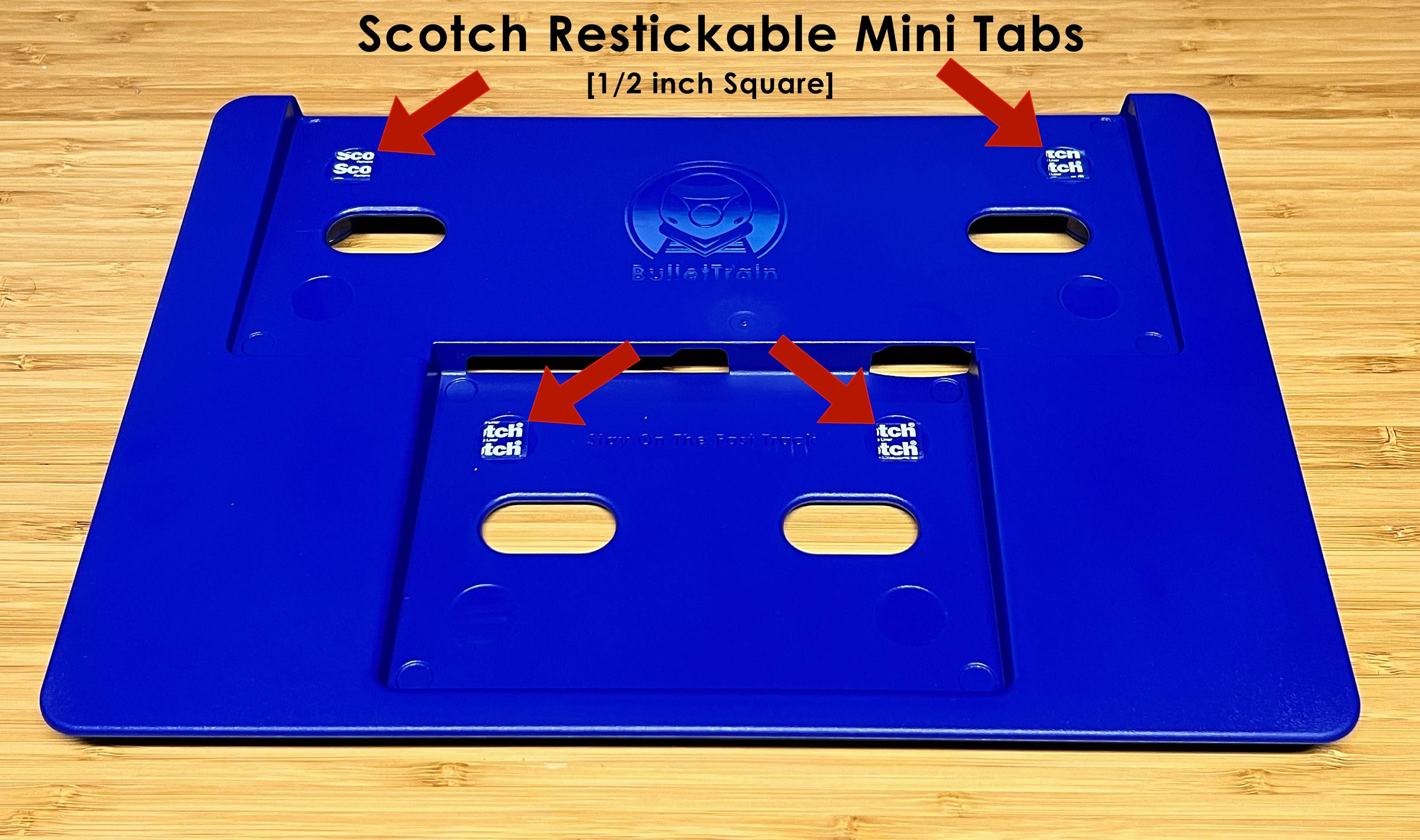
As you see in the photo above each BulletTrain eXpress Keyboard Platform comes standard with 4 Scotch Restickable Mini Tabs [.5 inches square], each of which is located in the round recesses located in the top corners of where the Apple Magic Keyboard and Trackpad sit. 


INSTALLATION INSTRUCTIONS

In order to use these you need to remove the clear plastic covers with white letters on them in order to expose the stickiness.

The purpose of these Restickable tabs is to allow the user to place the Apple Magic Trackpad and then the Apple Magic Keyboard in place, and hold them so if you were to turn the BulletTrain eXpress Keyboard Platform they would NOT fall out. 

We don't currently offer replacement tabs, but you can easily purchase these Scotch Restickable Mini Tabs on Amazon using our affiliate link, and they are relatively inexpensive at around $5.50. 


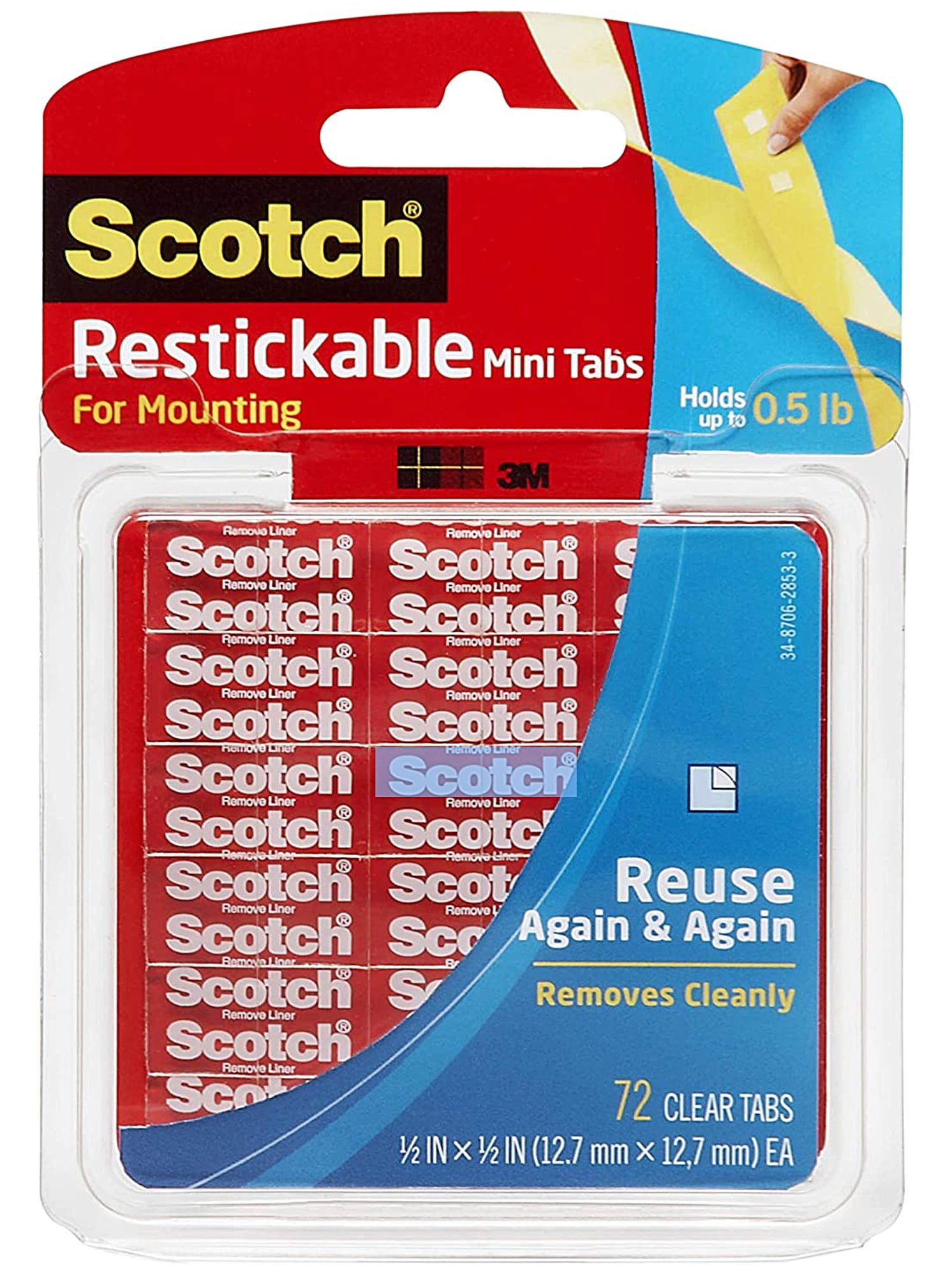
The Scotch Restickable Mini Tabs are great for many purposes. If you purchase them in the package seen above you get 72 of them, which means you will have a lifetime supply, as they last a really long time. Also, there are many other great uses for them you will likely discover.

The beauty of these tabs is that they are strong enough to hold your Apple Keyboard and trackpad in place, but easy to remove. 


REMOVAL INSTRUCITONS

It's really easy to remove your Apple Keyboard and trackpad from BulletTrain eXpress Keyboard Platform after they have been attached to the restickable tabs.

Simply place your eXpress upside down on a soft flat surface like on a bathroom towel, and place your thumbs over the oval holes and press the keyboard out first, and then the trackpad.


If you need to replace older Scotch Restickable Mini Tabs it's really easy. All you do is remove the old Mini Tab. If it seems like it's stuck really well to your eXpress just use your fingers to apply rolling pressure and they will come off pretty easily.


ONE MORE THANG

Our current 3rd generation BulletTrain eXpress Keyboard Platform is compatible with the older style rechargeable Magic Keyboard and Trackpad as well as with the latest generation models which feature a Touch ID button on the keyboard. 

The latest generation Touch ID Keyboard (pictured below) is slightly narrower than the older version, and if you were to place it in the BulletTrain eXpress Keyboard Platform without using the Scotch Restickable Tabs, it would slide around and if you were to turn the eXpress upside down, would fall out. By using the Scotch Restickable tabs, it will perfectly hold the Magic Keyboard with Touch ID perfectly in place so it does not move at all.


Wednesday, September 21, 2022

New Generation: BulletTrain eXpress Keyboard Platforms


Made In U.S.A. 


New Generation 

BulletTrain eXpress Keyboard Platforms

New 'Crystal Clear' Model


BulletTrain has been in the process of moving production from China to the United States, which is great in many ways. It has not been easy, but there are many, many upsides! We recently began our first production run for our current BulletTrain eXpress Keyboard Platform, and we added a fascinating new color which is pictured below. This new model is made from clear transparent polycarbonate, and has matching clear feet, as well as clear rubber feet which makes it look like its made out of clear glass while also offering a more modern/industrial/otherworldly/tech look...This new model will be a limited edition, and cost $20 more than a standard color BulletTrain eXpress Keyboard Platform.


This new eXpress model looks like it's made from frosted glass which kind of puts more emphasis on the Apple Magic Keyboard and Magic Trackpad. Like all our colored eXpress models, it is highly scratch resistant as it features our micro-bead-blasted finish, so it should never age. Also, this Crystal Clear model will match all our other colors as far as basically being EXTREMELY sturdy, and basically unbreakable. This model also comes with a Lifetime Warranty as it is built to last...


This new model is made from premium polycarbonate which features UVB protection, which means it will always stay clear, and never yellow. The production prototype pictured above features optional ruby red feet, but we intend to offer the clear model with matching clear feet, as well as an option to customize your feet colors with our classic colors of Ruby Red, Polar White, BulletTrain Blue and Stealth Black. The model in the photo above features a black Apple Magic Trackpad, with a standard white Magic Keyboard with Touch ID.


This photo above shows our new Made in the U.S.A. Ruby Red BulletTrain eXpress Keyboard Platform, with a black apple Magic Trackpad, and a custom painted black Apple Magic Keyboard. Below is a photo of the Crystal Clear BulletTrain eXpress Keyboard Platform with stealth black feet.


In the future, we might add optional colors to the eXpress line, which would be really cool.

In an ironic twist of fate, back on September 28, 2005, I had the opportunity to sit down with Steve Jobs in the Apple Boardroom in Cupertino to pitch him on a potential strategic partnership for BulletTrain to do advanced design work for Apple. The irony is two of the precursor eXpress prototypes I showed Steve had transparent bodies, just like the new crystal clear BulletTrain eXpress Keyboard Platform pictured above! It's hard to imagine that meeting took place 17 years ago! So we now have all our classic BulletTrain eXpress Keyboard Platforms in-stock and ready for immediate shipment from BulletTrain.com!!!!

Saturday, November 6, 2021

BulletTrain Keyboard eXpress Pro Platform Preview


BulletTrain eXpress 

Pro Platform Preview

Is Bigger Better?


The photo below showcases the very first physical prototype of the BulletTrain eXpress Keyboard Platform PRO that is holding a full-width Touch ID Magic Keyboard with Numeric Keypad that I have been using for several days and it is a complete game-changer!!!! I mean I am REALLY Surprised with how much I LOVE this think and how genuinely useful and beneficial it has been to my workflow!!!!


The two photos below also show the 3D Printed BulletTrain eXpress Keyboard Platform PRO, which we plan to bring to market soon. I would not bring this full size BulletTrain eXpress Keyboard Platform to market unless I thought it was amazing and potentially better than our standard BulletTrain eXpress Keyboard Platform. 

What makes the BulletTrain eXpress Keyboard Platform PRO better than the existing BulletTrain eXpress Keyboard Platform? The much wider body offers a significantly wider right wrist rest which is really comfortable. In apps where I scroll a lot like Safari, photos, and the finder it is extremely useful to have a dedicated Page Up, Page Down, Home & End keys!!!!!! Also, having a dedicated delete forward key is pretty cool.


Having the inverted T-Cursor key layout is really nice, as well as having a dedicated numeric keypad for typing things like phone numbers or working on spreadsheets is also great. Before I made and started using an eXpress I had a full-size keyboard with the inverted T cursor and number keys, which was more than a dozen years ago, but my muscle memory is still there for using the numeric keyboard, which is excellent for typing numbers, especially for things like calculating numbers using dedicated addition & subtraction, and multiplication keys. 

I say this as I got used to just using the upper number keys like on a MacBook, so it is nice to have the convenience of the dedicated numeric keypad back.

Also, having 7 additional programmable F-Keys is amazing for creating one-touch keyboard shortcuts with apps like Size-UP and MooM, which are great for radical windows management with a 6 monitor setup. I used Size-Up to program the F18 and F19 keys to make any window take up 50% of the width of whatever monitor they are on. So being able to move ANY app window with the touch of a button to the left or right of any screen is a godsend. Also, I use Moom for moving any window to any monitor very easily by tapping on the F17 key to activate the arrow keys. This solution has radically improved my workflow!!!

The full-size BulletTrain eXpress Keyboard Platform PRO is surprisingly lap friendly and comfortable which is an added bonus. As strange as it might sound, it makes me feel more like a PRO when I use it!?!! And in the looks department it looks surprisingly cool and proportional.


I have had to retrain my muscle memory when using this bigger setup since the space bar is much wider, so for things like 'Command + N", I initially kept minimizing the app I was in as I would hit the 'M' key instead of the 'N', but I it only took a few days to adapt. Also, the full size keyboard has a right 'Control' key which the smaller Apple Magic Keyboard lacks.


Why Make A Wide-Body eXpress?

In June of 2017 when Apple introduced the first wireless Magic Keyboard with a numeric keypad customers began writing in asking if we planned to make a wider BulletTrain eXpress Keyboard to accommodate it. I initially was against the idea as the reason I made the original eXpress was to create the most ergonomic desktop keyboard that was almost identical to a MacBook Keyboard. 

The original eXpress worked so well and was so comfortable with its built-in wrist rest I initially thought there was not a good reason to make an eXpress for the full size keyboard. Boy was I wrong!?!! As the years went by I kept thinking about it, and we slowly started doing conceptual designs. Now that we have made one I am stunned with how much I love it for the desktop!?!!

We have been working on making our eXpress Pro BulletTrain eXpress Keyboard Platform for a while and expect to have it to market in the first half of 2023. This all-new model will work with both the current Magic Keyboard with Numeric Keyboard as well as the all-new Touch ID model. It has all benefits of it smaller sibling like access to charge ports without having to remove the keyboard or trackpad, so you can use it while you charge, and the list of benefits goes on and on.


BulletTrain eXpress PRO Keyboard Platform Prototype pictured above on right, 

next to standard BulletTrain eXpress Keyboard Platform for Apple Magic Keyboard & Trackpad.


This 'eXpress Pro' model was designed with professional users in mind who specialize in Video, Graphics and Accounting, but can be enjoyed by anybody who wants all benefits of the numeric keyboard as well as the inverted 'T' Cursor arrow keys as well as dedicated Page Up, Page Down, Home & End keys. The eXpress Pro will come in our classic colors of Ruby Red, Polar White, BulletTrain Blue and Stealth Black. Below are some early renders.


Wednesday, June 23, 2021

2021 Touch ID Magic Keyboard + Magic Trackpad 100% Compatible with BulletTrain eXpress Keyboard Platform!


2021 Touch ID Magic Keyboard + Magic Trackpad


BulletTrain eXpress Keyboard Platform


I am very happy to report our BulletTrain eXpress Keyboard Platform has been tested and is 100% compatible with the 2021 Touch ID Magic Keyboard & Magic Trackpad which are currently shipping exclusively with the all-new 24" iMac!!!


The ONLY way to purchase the new Apple 2021 Touch ID Magic Keyboard and Magic Trackpad II is to purchase them with the new 24 inch iMac, but it is likely just a matter of time before Apple starts selling them separately. So if you have the new 24 inch iMac with the Touch ID keyboard & Magic Trackpad and you want all the benefits of a BulletTrain eXpress Keyboard Platform rest assured they are 100% compatible out of the box!


Friday, May 15, 2020

Options for Using The BulletTrain eXpress Keyboard Platform with a Windows PC


Options for Using 

The BulletTrain eXpress Keyboard Platform

With a Windows PC


A customer wrote in recently and asked if the BulletTrain Keyboard Platform worked with a PC running Windows. They asked:

"I have one of your products for Mac keyboard and trackpad which I love. However I may have to go and work in an office with PCs and don't want to do myself damage with a desk-based keyboard and click-mouse. Is there any way to adapt one of these for PC? Do you make one for PC - or know how I might get one?"

The short answer is 'Yes', and here are some things to consider:


Basic PC Compatibility

Since the Apple Magic Trackpad 2 and Magic Keyboard are Bluetooth you can use them with a PC. Just pair them using Bluetooth and they will work. The only drawback with this approach is that it would lack the gesture features that allow you to useful things like scroll with two fingers to go up and down a page as well as using gestures to swipe back and forth in a browser window.


Boot Camp Compatibility

From what I understand if you run the Mac OS on an Intel based Mac using the available Apple Boot Camp drivers, everything should work like a Mac.


Install Apple Magic Trackpad
with Windows Precision Drivers

I discovered a few videos that offer insight on how to use Windows Precision Drivers to get the Apple Trackpad gestures to work perfectly and you can learn more in the following video.


Paid Drivers


There is a company named Magic Utilities that offers a product named Magic Trackpad Utilities. The only drawback is that they charge a yearly subscription fee to use their product, but as you see in the image below it looks well designed and easy to use. Since it is Software As a Service the developer it incentives to keep it up to date. Also, they offer a free fully functional 28 day trial and they offer two versions which support Windows 7+8 & 10.


ChromeBook Compatibility

The video below shows how to use the Magic Trackpad 2 with a Chromebook including all the gestures:


iPad Compatibility

I wrote an article about how the BulletTrain eXpress Keyboard Platform is now 100% compatible with all iPads. You can learn much more by checking out my article about how the Apple Magic Trackpad 2 is now 100% compatible with Apple iPads iOS.

Wednesday, March 18, 2020

Magic TrackPad Fully Compatible with Magic Trackpad


Update on March 24, 2020: I downloaded iPadOS 13.4 onto a 12.9 inch iPad and paired a BulletTrain eXpress Keyboard Platform equipped with an Apple Magic Keyboard and Magic Trackpad 2, and it completely blew my mind!?!! With the advent of this new Trackpad functionality, it really does turn an iPad into a full blow Mac!!! I will publish more on this soon, but as of now I am blown away!!!!!!!


Amazing News!!!

Magic TrackPad 

Fully Compatible with Magic Trackpad


I have been waiting a decade for Apple to make the Magic Trackpad compatible the iPad, and it finally was announced today!!!! 


Why and I so excited about this fact? The BulletTrain eXpress Keyboard will be 100% compatible with the iPad, and now customers will be able to turn their iPad into a full-blown computer, which will be great for writers and creatives alike!!!


The photos above and below are from 2017, and show the eXpress in front on an iPad, and now this will become reality!!!! Apple announced this feature will be released on March 23, 2020 with the introduction of iPad 13.4 software update. 


Just to be crystal-clear, this update will add full-blown compatibility including multitouch gestures for trackpads. It is amazing how many customers have asked me if this feature existed over the years and I had to regretfully inform them it did not. Below is a new video that shows off the all new iPad Pro 11 and 12.9 that Apple also introduced today. These new iPads have better cameras and are faster than ever, and in this video we see the upcoming new Apple smart cover with built-in keyboard and trackpad.


Below is a photo of the new Apple trackpad which is part of the new Apple Magic Keyboard for iPadOS.


In the not so distant future, BulletTrain will be introducing new accessories for the iPad Pro that will truly revolutionize the iPad, so stay tuned!!!! To learn more about how the new iPad trackpad functionality works be sure to check out The Verge article named "Here's how the ipad's new trackpad actually works."


The video below offers an excellent tutorial on how to pair and use a Magic Trackpad with an iPad.


Wednesday, September 25, 2019

Update on BulletTrain Express Keyboard Platform Inventory


Update on 
BulletTrain Express Keyboard Platform Inventory

& Some Cool Prototypes


We are in production on a new batch of BulletTrain eXpress Keyboard Platforms and expect to have more of all colors in-stock on or around October 1, 2019.

In the meantime, I thought I would share these photos with you of eXpress Keyboard Platforms with a black custom painted Apple Keyboard and Trackpad. I had Colorware paint the Apple Keyboard and trackpad and here are some photos...Unfortunately, just after I ordered the black keyboard and trackpad Colorware discontinued their service of painting these devices :-)


Monday, August 5, 2019

Microsuction Removed From BulletTrain eXpress Keyboard Platform Second Production Run


Update, October 20, 2019: I have been experimenting like crazy and talking with customers about the removal of Microsuction from the BulletTrain eXpress Keyboard Platform. I have come up with a new solution that will replace the Microsuction. Ironically, the first generation of BulletTrain eXpress Keyboard Platforms used this 3M product, and it worked perfectly!

Also, you can purchase the Scotch Restickable Mini Tabs very inexpensively at many drug stores, and Amazon sells a pack of 72 for $3.56. We will soon be adding these to all the BulletTrain eXpress Keyboard Platforms we have in-stock, at which time I will update this article, and likely remove it.


Microsuction Feature Removed From 

BulletTrain eXpress Keyboard Platform

Second Production Run

We just finished the second production run of the BulletTrain eXpress Keyboard Platform and I wanted to share one design characteristic I changed. I made the decision to remove the 8 circular Microsuction discs each eXpress had, and here are the reasons:

1. Many Customers didn’t to use them, or have a need to use them. I learned this from talking to many customers.

2. Many Customers didn’t even realize they were a feature.

3. It was confusing for many customers who were not familiar with how Microsuciton works.

4. Microsuction is great in many products, but with the eXpress Keyboard Platform becasue of the angles it had a tendency to hold too well, making it a challenge to remove the keyboard and trackpad. Often times after removing the keyboard and mouse, the Microsuction would get torn and become useless. This was the issue that most influenced my decision to remove it.

5. As a designer my goal is to design products that are so intuitive and simple they don't require any kind of instructions to use, and that is now the case with the eXpress Keyboard Platform.

The sole purpose of the Microsuction was that if you regularly travel with the express or move it around in a home or office the keyboard and trackpad could not fall out on the floor by mistake. The issue is that when populated with the keyboard and trackpad, an average person would probably assume it was a whole keyboard and if they were to pick it up and turn it upside down by mistake the Microsuction would stop the keyboard and trackpad from falling by accident.

That being said, we have two great Do It Yourself Solutions that work well, are super easy, and invisible for keeping the Apple Magic Keyboard and Magic Trackpad from falling:


OPTION 1: The first option is to use regular Scotch tape on the bottom of your eXpress to basically tape the Apple Keyboard and Trackpad in place as seen in the photo below. Doing so makes it so no matter what you can easily remove them if you so desire.


Option 2: The second solution requires double-sided tape as seen in the photo below. You simply put in four pieces of tape, then install the Apple Keyboard and Trackpad on top of them, and press down in the areas where the tape is located to form a stronger bond.


Also, when I first designed the most current generation of the eXpress Keyboard I thought people would never have a need to remove their Apple Magic Keyboard and trackpad once installed, but I found myself wanting to do so on rare occasions as it made it much easier to clean between the edges of the trackpad and keyboard, if something got stuck there by mistake like crumbs or dust.

Sunday, January 22, 2017

3rd Generation eXpress Keyboard Platform


3rd Generation eXpress Keyboard Platform
First Production Prototypes Photos


Hi Everybody!!!!
I have some great news for you!
I recently received the first 3RD Generation production BulletTrain eXpress Keyboard Platform prototypes from our toolmaker and they are AMAZING!!!!!!

Typically the first prototypes made from a tool are referred to as T1 prototypes, and usually there are a bunch of issues and challenges with them. I am happy to report the first prototypes are excellent and don’t seem to need any major modifications! 

The photos above are of the actual T1 prototype. The build-quality is superb, and it so strong and stable, it almost feels like it is made of metal. This was not a coincidence, as my engineering team and I designed it to be this way. As a matter of fact, it is so well designed and engineered, that there is zero torque. If you hold the new eXpress in your hands, and try hard to twist or torque it, it won’t budge. This is remarkable considering we achieved this with true unibody construction, which is a first for the eXpress.
There are a few small modifications and details that will be fine-tuned, and also the tool has to textured. If you look closely at the photo, you will notice the T1 prototype has a glossy, piano black finish, and this is due to the fact the tool has not been textured yet. In other words, the final production model will have more of a matt finish, which will help hide blemishes and scratches.
I am typing this update on a T1 prototype, which I have been testing for several days, and it it BulletProof stable, and the fit and finish is perfect…They say the third time is a charm, and with the 3RD Generation eXpress, I think it is flawless in every way. In other words, in looks and function it is 100% with zero room for improvement.
After my engineering team finishes their evaluation, we will take the next steps toward production. We will have to wait a few weeks for our toolmaker, as they are celebrating Chinese New Year, but when they get back, they will make T2 prototypes, and if we are fortunate, after my team and I evaluate them, we will go into full production. Hopefully, this will result in us shipping out your BulletTrain eXpress Keyboard Platforms around the end of February.
I realize it took longer than expected, but it was imperative we deliver a BulletProof and flawless product you will love and  benefit from for years.
As soon as I have the T2 prototypes, I will publish another update with photos.    
Warmest regards,
Jake

Wednesday, May 18, 2016

BulletTrain eXpress Keyboard Platform


Formal Preview
BulletTrain eXpress Keyboard Platform
All-New Gen 3 Model 

We are putting the finishing touches on our launch campaign for the all-new BulletTrain eXpress Keyboard Platform, which we plan to launch on Indigogo.com at the end of this month. If you are not on our newsletter list, be certain to sign-up on BulletTrain.com [at the bottom of any page], so you will be the first to learn all the fascinating details. Below is a photo of the all-new eXpress, and it is amazing!!!!


Friday, February 1, 2013

Apple Opens Up Bluetooth Keyboard Support for Apple TV!!!


Apple Opens Up Bluetooth Keyboard Support for Apple TV!!!

It's been a long time coming, but Apple finally added a feature that allows the Apple Wireless Keyboard to control the Apple TV! I have been experimenting a BulletTrain eXpress Keyboard Platform to control my Apple TV and it is so much better than using any remote control. Particularly for typing in words. Using a BulletTrain eXpress Keyboard Platform also make using the Apple keyboard much, much more ergonomic, especially if you are sitting on a couch or in bed.

Friday, December 21, 2012

Robert Scoble Praises his BulletTrain eXpress Keyboard Platform


Robert Scoble 

Two Thumbs Way Up For His 

BulletTrain eXpress Keyboard Platform


Robert Scoble A.K.A. "The Scobleizer" is one of the best known tech evangelists and recently Robert gave the BulletTrain eXpress Keyboard Platform two thumbs way up when he said:

"I love my BulletTrain eXpress Keyboard Platform and depend on it every day. The eXpress has become an essential tool as part of my desktop workstation! It is very comfortable and freed up so much of my desktop real estate. I also love the fact I can easily use it on my lap as well. As you can imagine, I scour through tons of tech and very rarely come across something truly useful like the BulletTrain eXpress Keyboard Platform." –Robert Scoble (November 2012)

This video of Robert Scoble commenting on his BulletTrain eXpress Keyboard Platform on his desktop just came in today:


Wednesday, December 19, 2012

Kay Overcoming Arthritus with her BulletTrain eXpress Keyboard Platform


...A Heartwarming Holiday Story...

Kay Overcoming Arthritus

with her 

BulletTrain eXpress Keyboard Platform

When I originally built the first prototype of the BulletTrain eXpress Keyboard Platform back in 2010 that reconfigured the Bluetooth Apple Wireless Keyboard and Magic Trackpad into a keyboard tray or platform, my goal was not to make the best looking desktop keyboard, or to free up more than 50% or your precious desktop real estate. 

My goal was to create the most ergonomic and comfortable keyboard. Having previously suffered from Repetitive Stress Injury (RSI), I was on a mission to figure out how to stop RSI, as well as Carpel Tunnel Syndrome. Ironically, I developed RSI by using a Microsoft "Natural" ergonomic wave keyboard along with a Kensington trackball.

Over the years I have spoken with many, many customers who have told me that by using the BulletTrain eXpress Keyboard Platform, it not only reversed their RSI, but cured it–permanently. I should know, because I am one of them. It is hard to believe something so simple works so well, and it does.

Whenever I speak with a customer on the phone, I ask them two questions. First I ask them what Mac they are using their eXpress with, and I ask them how they found out about the BulletTrain eXpress Keyboard Platform? Customers most typically answer the later question by saying something like, "I bought an Apple wireless keyboard and trackpad, and the trackpad was way too difficult to use, and felt awkward having it located next to my keyboard. I did an internet search and looked at all the different solutions, and ended up concluding that the BulletTrain eXpress Keyboard Platform was by far and away the best, and I couldn't fine anything else that even came close."


Real Customer Care

Printed on the inside of every BulletTrain eXpress Keyboard Platform box it says "We Really, Really, Really Care." This is absolutely true. There is nothing more rewarding as a designer than knowing I significantly helped improve the quality of a person's life, particularly when it comes to how they use or benefit from using a computer. I believe that computing devices, coupled with the internet, and world-class search engines are the key to unlocking mankind's full intellectual potential. As a designer, I not only want to make certain that nobody is left behind, but that every person is able to optimize their computing experience. I coined the term "friction-free computing" many years ago, and this phrase is my guiding light with BulletTrain design.

Over the years I have spoken with many of my customers who suffered from all kinds of physical handicaps they were able to overcome with the BulletTrain eXpress Keyboard Platform! This includes not only people who suffer from Repetitive Stress Injury (RSI), and Carpel Tunnel Syndrome (CTS), but also people who suffer from severe Motor Neuron Disease (MND), as well as Tendonitis and Rheumatoid Arthritis (RA). I have also spoken with customers who are paraplegic and are confined to a wheelchair who have personally thanked me for bringing the BulletTrain eXpress Keyboard Platform to life, and sharing with me how profound of a positive effect the eXpress had on their ability to use their computer.


Ergonomic Issues


How serious are the ergonomic issues? Very Serious! I strongly believe keyboard and mice usage will become the new cigarettes of the 21st century. In other words, as the computer generation advances, and more people develop cumulative trauma disorders, the world will look back and point the finger at old-fashioned keyboard and mice.

I believe there is a still tremendous room for improvement on the keyboard and pointing device front. If you examine an original Mac from 1984 to a 2012 iMac, they could not be more night and day. One has a tiny black and white screen and the other has a super high-resolution screed with super-vivid colors. Same thing with every other computer attribute including RAM and storage capacity, as well as CPU speed. But the keyboard and mouse is almost identical. The only real difference is that they went cordless. This is ironic because the keyboard and pointing device are probably the most important part of the computing experience, because this is the primary mechanism by which we interact with the computer. At BulletTrain, in the upcoming years, we intend to continue to revolutionize the keyboard and pointing devices in deeply profound and meaningful ways.


A Superb Solution


Last week I was talking to a customer and he mentioned he had an elderly friend named Kay who was 82 years old and really smart and sharp, but suffered from severe rheumatoid arthritis in her hands. He mentioned he took her to the Apple store and helped her purchase and iPad. Kay brought the iPad home and tired desperately to use it, but in the end she had no choice to return it, because her sever arthritis stopped her from being able to use the touch interface effectively.

Kay's and her friend were able to setup a Mac Mini with a big screen so she could sit in front of it in her favorite recliner. Using a mouse was obviously not an option, so Kay tried to use her Apple Wireless Bluetooth Keyboard and Magic Trackpad by balancing them on her lap, but it was impossible to use, and she could not click on her trackpad because it kept falling off her lap onto the floor, so Kay did what many of our customers do out of desperation and necessity–they attempt to build their own BulletTrain eXpress Keyboard Platform. The photo below shows Kay with her "DIY" Do it yourself BulletTrain eXpress Keyboard Platform, which consists of a her Apple keyboard and trackpad being balanced on top of a coffee table book.


Kay's self-made solution allowed her to overcome her challenge and finally be able to use her mac. The only challenge is she had the keyboard hanging off the edge of the spine of the book, and the trackpad still moved around, not to mention the added weight of the book. 


When Kay's freind saw her self-made solution, he decided that somebody had to have addressed this same issue. I spoke with him on the phone and he told me he did an internet search and had looked at every other solution, which would not work, so he called me on the phone to discuss if the BulletTrain eXpress Keyboard Platform might allow Kay to completely overcome her solution. 

First he asked if Kay got a BulletTrain eXpress Keyboard Platform, would she be able to press down on the trackpad and receive the positive tactile-feedback click to which I positively answered, yes. His second question was, would it be comfortable on her lap? I mentioned the BulletTrain eXpress Keyboard Platform is extremely light-weight at just over a pound, yet very strong and stable. I also mentioned I designed the bottom chassis to ergonomically fit perfectly in your lap.


The photo above shows Kay with her dog sitting next to her, with her BulletTrain eXpress Keyboard Platform on her lap, which allows her to completely participate in the digital age–which most people take for granted. Since Kay has sever arthritis, the BulletTrain eXpress Keyboard Platform gives her an ergonomic wrist and palm rest so she can navigate the screen with her trackpad and type comfortably. Apple claims to go out of their way to create solutions for handicapped people, which they refer to as "Accessibility" features. 

I know Apple is well intentioned and does much great work, but there is much, much room for improvement in this area. I am calling on Apple to please open up the API on the iPad, iPhone & iPod Touch so it can be used and controlled with the Magic Trackpad. Doing so would allow many, many handicapped people to be able to much more effectively use their iPads. 


I am also calling on Apple to do the same by opening up the API on the Apple TV to be able to use the Bluetooth Apple Wireless Keyboard and Trackpad as well. Doing so will open up a whole new world of possibilities for everyone. For example, Kay could simply plug in an iPad or iPad Mini via HDMI to her flat screen TV and use the BulletTrain eXpress Keyboard Platform to do everything should she can't do on an iPad because of her arthritis, not to mentioned, it would be much easier for her to see everything on her large flat TV screen than on a tiny iPad screen. Everything would be better including her ability to watch movies on the big screen. 

Also, by using her Apple Magic Trackpad to navigate her iPad she could not get fingertip oils rubbed all over her iPad screen, which she would have to constantly clean off. Apple, it is time to make the "Magic" Trackpad live up to its name and full potential!!!

If You Enjoy The BulletBlog by JAKEe Be Certain To Check Out Jake's Other Blogs: