Tuesday, March 15, 2011

Move Magic Trackpad Between Macs...


Move Magic Trackpad Between Macs

Christopher Breen at Macworld just published an article showing how to use one Magic Trackpad between multiple Macs, which I did not realize you could do!?! Very cool...I have not tried it out yet, but I assume you can also do the same with Apple wireless keyboards?

In the future, I plan to put together a detailed guide that covers much of detail between how the Apple Bluetooth Keyboard and Trackpad work.


Monday, March 14, 2011

Better Touch Tool: Solution for Jumping Cursor...


Better Touch Tool
Solution for Jumping Cursor

A very small portion of BulletTrain Express users (less than 2%) have experienced a challenge where the cursor would randomly jump around the screen and Better Touch Tool just released a new version (0.671) of their software that completely overcomes this challenge.

Downloading and installing this solution should take less than a minute. Just follow these detailed instructions please:

If you are not familiar with Better Touch Tool, it allows you to assign just about any kind of gesture to any function for using with the Apple Magic Trackpad. Version 0.671 has a new feature added to it named "Magic Trackpad: don't allow tap to click on the left and right edge." This feature completely overcomes the Jumping Cursor Challenge and there are 2 ways to install it:

Update Option: If you already have an earlier version of Better Touch Tool installed, you can click on it in the Apple Menu Bar located at the top of every Mac screen, and select "Check for regular updates."

Download Option: If you do not have Better Touch Tool installed you can download version 0.671 by clicking here.

Usage Instructions: Once you have downloaded and installed the 0.671 version of Better Touch Tool, you can access the "Preferences" dialog box by clicking on the Better Touch Tool icon located in the Apple Menu Bar located at the top of every Mac screen.

1. You will see a toggle button located in the upper left hand corner of the "Preferences" screen, click on "Advanced."

2. You will see on the far right side of the Better Touch Tool Preferences window, a button named "Trackpad" which is located between the "Mouse" and "About" buttons. Click on "Trackpad."

3. Click on the "Taps" tab as seen below. (Highlighted in blue)

4. Click the box to turn on "Magic Trackpad: don't allow tap to click on the left and right edge."

5. I recommend starting it at 10%, and and you can always adjust it later if need be.


Better Touch Tool is an amazing piece of shareware, meaning you can use it for as long as you want without having to pay anything, but if you enjoy its features, you can make a donation by going to the Preferences dialog box and clicking on the Donate button.

In the future, I will be doing a video that showcases many of the amazing features of Better Touch Tool.

If you have any questions, concerns or comments please contact me: Jake@BulletTrain.com or call us at (415) 440-1400.

I would also like to thank Andreas at Better Touch Tool for making such an amazing piece of software, and for adding this valuable feature that allows people to better enjoy their BulletTrain Express Keyboard Platform.

To learn more about the Jumping Cursor Challenge, please click here.

Friday, March 11, 2011

BulletTrain MagicStand Works With Ipad 2!!!!!


BulletTrain MagicStand Works With Ipad 2!!!!!

Great news!!!! The BulletTrain MagicStand works perfectly with the iPad 2!!!! This makes it one of the very few iPad accessories that was not completely obsoleted by the iPad 2, which I believe speaks volumes about the design integrity at BulletTrain. Even Apple's own iPad case was completely, obsoleted by the iPad 2.

Ironically, the BulletTrain MagicStand appears to fit the iPad 2 even better than on the original iPad since the all-new iPad 2 has a flat-back and is slightly smaller.

Wednesday, March 2, 2011

BulletTrain MagicStand for iPad 2 Compatibility Update...


Timeless Design At Its Best

BulletTrain MagicStand for iPad 2
Compatibility Update

Top 1o Reasons the MagicStand for Ipad 2 Remains the Best Stand

A few thoughts on Apple's iPad 2. It looks great and one of the obvious questions is will it work with the BulletTrain MagicStand? Since we have not had a chance to experiment with an iPad 2, I can only say from studying the design of the iPad 2 it appears as if it will work flawlessly with the iPad 2.

As the designer of the BulletTrain MagicStand for iPad, I can say if it does work perfectly with the iPad 2, I will only have to make the slightest modification to one small part and if that is the case, I have the modification ready to go. The day the iPad 2 is available for purchase, we will buy one and test it and update this story to confirm that it is 100% compatible with the iPad 2.
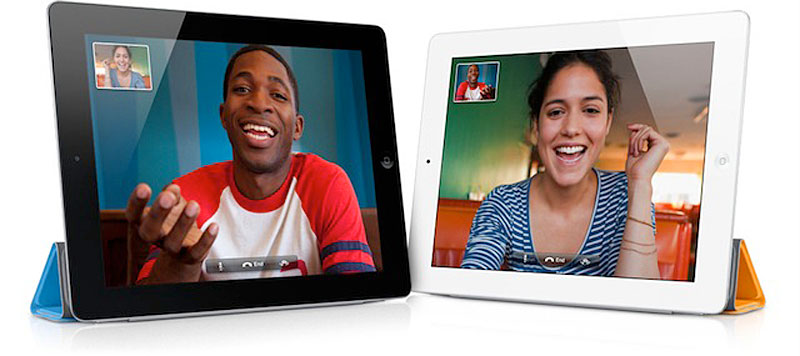


I have a few observations to share with you about the iPad 2 in relation to the BulletTrain MagicStand:

1. Timeless Design: The BulletTrain MagicStand is absolutely TIMELESS!!! If you examine Apple's first generation case for the iPad and you compare it to the all-new Apple iPad case/stand, they are absolute night and day. In other words, there is ZERO compatibility going each way, in that the first generation Apple iPad case/stand will not work with the second generation iPad case/stand.

2. Limited Positions: I would argue the Apple case/stand is extremely limited in that it can only be positioned in two different positions. One for steep typing, and one for a fixed TV viewing angle. The severe limitation with the TV viewing angle is if you are getting glare, you can't adjust it at all. With the MagicStand you can adjust it to any angle.

3. Stability: Also, the Apple stand looks like it would not only fall over easily (like with the 1st generation Apple iPad case), but if you tried to use it in bed, it would not be stable and would likely not even be able to stand-up, and if you move in the bed, it would likely fall over.

With the BulletTrain MagicStand for iPad, it is to timeless in its design and function that it will work identically, except you will gain extra features:

4. Camera and Video Camera Tripod: MagicStand with iPad 2 gives you a perfect Tripod for taking photos and shooting video. Since the iPad incorporates an HD camera on its backside, the MagicStand can act as the perfect tripod for taking photos and shooting video at any angle. Since the BulletTrain MagicStand can sit at ANY angle between a straight right angle at 90 degree, and can sit at any angle all the way down to 22 degrees, it is perfect for taking still photos and video.

5. Facetime Stand: Since the iPad 2 has 2 video cameras built in (one of the front and one on the back) you can use the BulletTrain MagicStand for iPad to hold the iPad in the perfect position for video conferencing.

6. Presentation Tool: Since the new iPad 2 has video mirroring, the MagicStand will allow the ipad to become the ultimate presentation tool In other words, you will be able to give a presentation on a remote flat screen plasma or LCD TV, wirelessly and see and control exactly what appears on the Flat Screen with the iPad with the benefit of WSIWG. This will be great for Keynote and Power Point presentations, and you will be able to do this all without having to hold up the iPad in your hands.

7. Organic Design: It is crystal-clear that the aluminum BulletTrain MagicStand looks way more consistent with the design language of the iPad 2 than the sky blue iPad 2 Smart cover.

8. Thinness: Since the new iPad is 1/3 thinner, and since the MagicStand is just over a 1/4 inch thick, that means when you have the MagicStand attached to the iPad two, it should be less than 1/16 of an inch thicker than the first generation iPad. That is pretty profound if you think about it.

9. Weight Loss: the all new iPad 2 is 15% lighter than the original, which means that with the MagicStand attached, it will get even lighter!!!

10. Obsolescence: Just about every case and stand for the Original iPad just became obsolete for the Ipad 2, but not the BulletTrain MagicStand for iPad and iPad 2.

Another point, is that if you have a BulletTrain Express Keyboard platform paired with an iPad, you will now be able to control your iPad 2 that is hooked up to your flat-screen TV via HDMI output. Let's just hope Apple has the wisdom to allow the Apple Magic Trackpad to be paired with the iPad 2!!!

Sunday, February 27, 2011

Making Computer Gaming Into Video Gaming!


Computer Gaming On The BulletTrain Express

When it comes to gaming I have found that I could never have my cake and eat it too. Fallout New Vegas is a great example. I love playing it on my PS3, because I get to enjoy it on my 60-inch from the comfort of my couch, but the game uses up so much of my memory and processing speed that it regularly glitches and freezes.

There is also the issue of loading times video games are so well known for. When I play it on my computer, I get seamless gameplay, but I have to sit at a desk in front of a small screen.

Many people have been looking for a solution like the Bullet Train Express for converging their computer with their entertainment center for a long time.

Since the first BulletTrain Express Keyboard Platforms reached our customers, they have been sending us love letters and rave reviews about how it's changed their lives. The Express has unchained them from their desks and they can now work from their couches, their beds, or wherever they feel comfortable. Everyone is enjoying the new freedom offered by the Express in their work, but could it offer the same experience in their play as well?

Gamers out there would never think to use a trackpad instead of a mouse, but that may be because before there never was one with 26.5 square inches of trackpad real estate. With Fallout New Vegas loaded my computer, hooked up to my 60-inch I decided to experiment with my Bullet Train Express.

After a few changes to which key does what, I have to say the Express made for the best gaming controller I have ever used (and I am not just saying that because I sell them). Using the directional keys to move and the trackpad to look around and turn made for much better and more precise control.

If you play a lot of RPG and first-person shooter games like Fallout New Vegas you will love this feature. I was able to use all my fingers, which I could not do with a controller or keyboard and mouse configuration. A few hours into it I got used to the key configuration and I was flying it like never before.

Thanks to the Bullet Train Express gamers can now benefit from all the games on your computer without the drawbacks. You can have your epic computer games and play them too. The only issue you will have is the Bullet Train Express will make you even more addicted to your games than you already are!

Mobile Mouse Pro Remote/Trackpad


Mobile Mouse Pro Remote/Trackpad

I don't know what I would use Mobile Mouse Pro for, but it sure is fascinating!!!

Monday, February 21, 2011

Using A BulletTrain Express Keyboard Platrfom with a PC


Using A BulletTrain Express Keyboard Platform with a PC
Apple Magic Trackpad with a PC

Many people have contacted us asking if they can use a BulletTrain Express with a PC, and the answer is yes!!! I put together this guide to share all the ways in which you can achieve this goal. As we experiment and learn more (often times from our customers) we will continue to update this guide.

I imagine the first question is why anybody would want to use a BulletTrain Express with a PC? There are a zillion reasons why a PC user would benefit from using a BulletTrain Express, and you can learn all about them on the microsite for the BulletTrain Express.

Recently a potential customer of ours named Amy wrote it and asked:

"I am a PC user and would love to have something like the BulletTrain Express for PC. Do you have anything in production?

Thank you!

Amy

As I mentioned, there are several ways to make this work and here they are:


Option #1: Standard Bluetooth Pairing On A PC

According to C-NET if you pair an Apple Magic Trackpad with PC, by default only single-touch and click function work. No multi-touch work.


Option #2: Loading Apple Drivers On A PC

The following video walks you through how to download and use the Apple drivers to pair your Magic Trackpad to a PC. As mentioned in the video you get to use the left and right-mouse clicking, as well as being able to scroll with two fingers.

Update on June 11, 2011: The drivers mentioned in the YouTube video below are available on the Apple Download site and here are the links:


Option #3: Magic Trackpad Control Panel for PC

There is a dedicated piece of software named Magic Trackpad Control Panel for PC which is produced by AnimGraph. A screenshot that of the PC Control Panel is located below and it shows all the options that are available. Magic Trackpad Control Panel for PC offers a free 28 day trial version and if you like it and want to maintain the benefit of its functionality after the trail it cost $7.90. I am pretty certain, if I understand it correctly, you can get all the benefits of this piece of software for free, but following the instructions in the video above.


Option #4: Trackpad++ Software


There is a piece of software named "Trackpad++" Apple has a thread on their discussion forum that discusses this topic named: A NEW TRACKPAD DRIVER IS OUT

I included a photo of the PC Trackpad++ Control Panel below. You can learn about and download Trackpad++ by Clicking Here.


If you have experience using a PC with the Trackpad++ and want to share your insight, please leave a comment or send us an email to info@BulletTrain.com

In the future, as time permits we will figure out everything we can and do a video showcase to share how this experience works...

BulletTrain Express Inspires Customer To Invest another $4000 in Mac Setup


A Customer's Comments On The BulletTrain Express
BulletTrain Express Inspires Customer To Invest another $4000 in Mac Setup

One of our customers's purchased a BulletTrain Express Keyboard Platform and a few days after it was delivered, he wrote in and said they liked it so much he was buying a second one. I was naturally curious, so I called the customer on the phone and he said:

You will never believe where I am!?! I am at Costco right now, purchasing two new 55 LCD TVs!!! Before I had a 37inch LCD TV in my living room with a Mac Mini hooked up to it and all I could do was watch Hulu and Netflix, because the Apple Wireless Keyboard and Magic Trackpad were so difficult to use. Then when I put them in the BulletTrain Express they got magically transformed and all of a sudden, I could do EVERYTHING I could do with my Macbook and Desktop Macs, except I could do it very comfortably from the couch.

So I am at Costco buying a 55 inch LCD TV to replace the 37 inch in my living room, and I am so impressed with the BulletTrain Express, I ordered a second one that I am buying another 55 inch LCD TV to use in my bedroom from bed.

The point that is so profound in my mind with our customer, is that our simple BulletTrain Express Keyboard Platform is an accessory, that got him to purchase 2 55inch LCD TVs and another Mac Mini, and another Apple Wireless Keyboard and Magic Trackpad. That is pretty profound when you think about it.

Then our same customer wrote this about the BulletTrain Express:

I actually have a (BulletTrain Express) keyboard/trackpad platform thingy and it is so effin sick for my mac mini set up from the living room couch. i ended up ordering a second one for my bedroom mini LCD set up too. Get one, use it, and try to live without it after a few hours of using it. So helpful, convenient. The keyboard trackpad is always exactly where they should be...never falling off the couch/bed. When my neck or back gets sore from sitting to much...voila...lay down on the couch and voila...ergo couch-o lcd-o...

Friday, February 18, 2011

The First Truly Convergent Device...


The First Truly Convergent Device
A Complete Game-Changer

What makes the BulletTrain Express Keyboard Platform the first truly convergent device? 10-15 years ago, in the world of computers, convergence was a very hot topic, and the word convergence became a buzzword.

Back then, people in the tech world realized that one day in the future, TV and Computers would converge and become one. The great unanswered question on convergence back then, of course, was whether we would end up with TV on our computers screens, or computer on our TVs?

Computer screen pixels pixel resolution grew faster on computer screens than on TV screens and that question was clearly answered–we ended-up with TV and Video on our computers–and we have had it for some time now. Over the past few years, video or TV on computers has almost become the new lingua franca of the web. Many people today don't even watch traditional TV today–instead they watch all video on their computer screen.

This shift represents an evolutionary step in the way we interact with these new-age tech tools. Another example of one technology supplanting the other over the same timeframe of the last decade is the cell phone replacing the land-line phone. The future of this will come over the next decade, where all video will become available on-demand over the web.


The Missing Piece of The Convergence Puzzle

Prior to the advent of the BulletTrain Express Keyboard Platform, the challenge was that there was a gaping, key piece of the convergence puzzle that was not only missing, but necessary.

Devices like TIVO and Apple TV attempt to overcome this challenge, but using a remote control which uses a 4-way toggle switch to type in show or movie names is extremely ineffective and represents a terrible economy of motion. There is nothing more frustrating than trying to type in a show or movie title and you mistype a letter or name and then you HAVE to navigate down to the delete (or clear, or space) sign and click it with the remote.

Remote controlled devices like the TIVO and Apple TV represent walled gardens that severely limit your access to content. Also, there is nothing more frustrating than when you are watching a TV show or a movie, and you see or hear something you want to look-up on the web or Wikipedia, and you can't access the web with these devices, and even if you could, doing so with a remote control would be like trying to lick the paint of the side of a barn with your tongue–you can do so, but it is painful, ineffective and it does not leave a good taste in your mouth :-P

There are many TV manufactures, including Samsung that are continually offering more web based Applications on their TVs, but once again, using a standard remote control is far, far from ideal.

Google TV offers a wireless keyboard that fits on your lap and has a trackpad. The great challenge with the Google TV keyboard is the trackpad is located in the upper right hand side of the keyboard, and it has a mini-trackpad, like most PC laptops do, that also represent a terrible economy of motion. In other words, using that tiny trackpad is like finger-painting because your index finger has to hunt so much. Google TV offers web surfing, but the experience is completely disjointed and dissimilar to your laptop or desktop experience.


The Missing Piece of the Convergence Puzzle Has Been Found!!!
BulletTrain TV has Arrived!!!

The BulletTrain Express Keyboard Platform, coupled with a Mac-Mini, and a large 1080P LCD TV delivers the missing and final piece of the Convergence puzzle!!! Even if you have an Apple Wireless Bluetooth Keyboard and Magic Mouse, paired with your living room or bedroom Mac-Mini and large flat-screen TV, it is a cumbersome experience. Trying to use a mouse or even a Apple Magic Trackpad on our couch is a complete pain, yet some people try by using their leg as a surface to run the mouse over.

You can even use your keyboard and mouse on the coffee table, but then every time you want to use them, you have to sit up from your comfortable reclined position, and lean forward like with a laptop, and it feels uncomfortable, unergonomic and strange–not to mention, it puts you back in that terrible leaning forward posture stance, much like a laptop or standard desktop.

The BulletTrain Express Keyboard Platform is the first device that truly delivers the first seamless and friction-free convergence experience. With a BulletTrain Express, and a Flat Screen TV, and a Mac-Mini, or even a PC hooked up to the TV, you can not only enjoy all the video on the web like a TV, but you can also use your TV identically to your laptop or Desktop, using the EXACT same methods and interface you are used to!!!!

In other words, the BulletTrain Express gives people the first truly Universal computing experience whether it is on a couch, at a desktop, or with a laptop hooked up to an external monitor, or even when paired wirelessly to an iPad!!!


The Future Of The BulletTrain Express
Friction-Free Computing has Arrived!!!

As the designer of the BulletTrain Express I can share two more profound points with you. The first point, is the keyboard is in many ways the most important part of a computer, because it is the way you control and drive your computer–just like a car. Unfortunately the keyboard and mouse/trackpad method of control has been severely overlooked for decades. In other words, the keyboard and mouse have evolved very little in the last 30 years.

If you compare the original 128k Mac from 1984 to a 27 inch iMac today, the screens are crazy, stupid different. One was a 6 inch, low resolution, black-and-white, low contrast screen and the modern 27 inch LCD with LED backlighting is a site to behold. It is an amazing universal window into the past, present and future.

Compare the RAM and processing power between the original Mac and current 27 inch iMac and you see the same enormous delta. Look at how they work. With the original Mac, you had to install a floppy disc to load the OS, and Applications, or to save data...you get the idea. Now compare the Keyboard and Mouse on the original 1984 Mac to to the one on the 27 inch iMac. They are not that much different. The iMac is wireless, and skinnier, but not that much different.

At BulletTrain we intend to continue to evolve and innovate in the keyboard space in ways that today are almost un-imaginable. Over the course of the next 6 months to a year we will continue to roll-out super-innovative, excitinh solutions that continue to evolve the keyboard and methods of navigation in this space. Stay tuned, and Stay On The Fast Track with the BulletTrain Express!!!!!!!

Wednesday, February 16, 2011

Quintessential Mac Mini Media Center Component...


...Kicking Back In Comfort...

Clint's BulletTrain Express Keyboard Platform
Quintessential Mac Mini Media Master-Piece

Clint sent in these photos and video of him kicking it in his recliner with his feet up on the fold-out ottoman, with a message saying:

Jake

The BulletTrain Express has already become the quintessential component of my Mac Mini Media Center. Thanks!

Clint


Monday, February 7, 2011

How to Install your MagicStand for iPad


How to Install your MagicStand for iPad

Installing your MagicStand for iPad is easy as pie. We just put together this video that shows you how easy it is to attach the BulletTrain MagicStand to your iPad. This video also covers how easy it is to remove your BulletTrain Express.

It is important when removing the 3M Command Strips to pull them straight away, and not at an angle. If you don't remove them straight, they could break in place in which case you just grab it and pull it again. In the highly unlikely event you were to break a strip and are not able to access it, don't worry, you just slip some dental floss in between the MagicStand and iPad and it will come off.


The reality is that once you install your MagicStand to your iPad, you will probably never want to remove it, but if you do it's really easy, and the 3M command strips leave ZERO residue. In other words, if you had a MagicStand on your iPad for 6 months, and you removed it, there would be nothing changed on the iPad that would ever indicate there was a MagicStand attached to it.

The Plaza Hotel: New York City All Guest Rooms Include iPads


The Plaza Hotel: New York City
All Guest Rooms Include iPads

The Plaza is renowned for being one of the top New York hotels, and they recently announced they are offering iPads in each and every suite and guest room. The iPads allow guest access services and room controls, and beyond–you can even order room service, request wake-up calls. Luxist.com has a great overview article that goes into detail on all the great features. Methinks The Plaza needs BulletTrain MagicStands for each iPad to complete them...

If You Enjoy The BulletBlog by JAKEe Be Certain To Check Out Jake's Other Blogs: